I’ve had the M5 Air for about six hours. This isn’t a review — I haven’t earned that yet. These are first impressions and the thinking that got me here.
The Context
I run a marketing consultancy and do photography on the side. I’ve been working off a MacBook Air M1 with 256GB for three years. It’s been fine. Then it stopped being fine.
The storage ran out slowly, then all at once. Client files, photo libraries, the usual accumulation of work. I got good at managing it — deleting old projects, shuffling files to external drives, clearing cache religiously.
But here’s what nobody tells you about running lean: the tools you skimp on cost you in ways that don’t show up on a balance sheet. Every workaround takes time. Every “let me find that file” moment in a client meeting costs credibility. Every decision about what stays and what goes is cognitive overhead.
I knew I needed to upgrade. I just kept not doing it.
How I Thought About This
I spent weeks researching. M4 vs M5. Air vs Pro. Should I wait for M6? What about a Mac Mini with more power?
Then I realized I was solving the wrong problem.
The question isn’t “what’s the fastest chip” or “how much RAM do I need for future-proofing.”
The question is: what are the tasks, and can the machine handle them without friction?
My tasks:
- Marketing strategy work: presentations, research, writing, client calls
- Photography: editing 61MP RAW files from my Sony, building portfolios
- Daily admin: email, browsing, life logistics
The M1 could handle all of this technically. The 256GB couldn’t. That was the actual constraint.
It’s the same depth-over-width philosophy I apply to AI tools — figure out what’s actually holding you back, then fix that one thing.
When the M5 launched with 512GB base storage, the decision became obvious. Not because I needed M5 performance over M4 (I don’t). But because the base config finally matched real use.
The Decision Framework
Here’s what mattered:
Storage: 512GB This is the unlock. Everything I’m actively working on fits locally. Client projects, current photo work, system overhead — all of it, with room to breathe.
Could I have bought an M4 with upgraded storage? Sure. But the M5 comes with 512GB standard. That’s the whole point.
One machine for everything I need a workhorse, not a stable of tools. Client work in the morning, photo editing in the evening, admin whenever. The Air handles all three without asking me to think about it.
Longevity I’m not buying a laptop for two years. I’m buying it for four or five. The M5 is already faster than anything I’ll throw at it. The performance ceiling is so high that I’ll hit other constraints (my bandwidth, project scope) long before I hit the machine’s limits.
That changes the economics. This isn’t a gadget purchase. It’s infrastructure.
The specs I didn’t upgrade:
- 8-core GPU (not 10-core): My work doesn’t need it
- 512GB (not 1TB): Enough is enough
- 16GB RAM (not 24GB): Overkill for overkill’s sake is still waste
Base config. That’s the story here — Apple finally shipped a base config that works.
Six Hours In
Setup: Migration Assistant from my M1 worked flawlessly. Two hours, everything transferred. Lightroom catalogs intact, project folders preserved, no drama.
First impression of speed: It’s fast. But honestly? The M1 was fast too. The difference isn’t “wow this is life-changing fast.” It’s “I haven’t thought about speed once.” Which is exactly right.
Storage relief: This is the real upgrade. I imported a batch of photos this afternoon without checking available space first. I just… did it. That sounds trivial. It’s not.
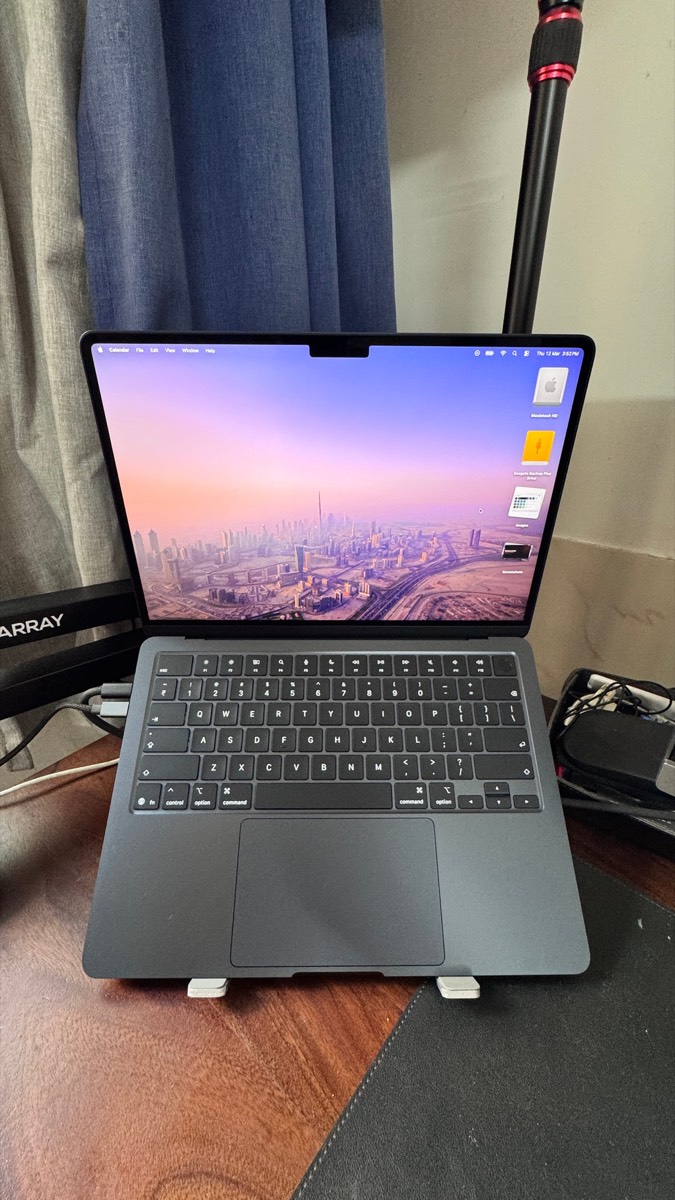
Build quality: Midnight finish shows fingerprints. I knew this going in. Doesn’t bother me — it’s a tool, not jewelry. The machine itself feels sturdier than the M1. Thin, light, solid. No complaints.
What I haven’t tested yet:
- Heavy Lightroom work (full edit sessions)
- Long client presentations with multiple apps open
- Video calls under load
- Battery life (claims 18 hours; we’ll see)
Ask me in a month and I’ll have real answers. Right now, I can tell you it migrated cleanly and doesn’t get in the way. That’s all I need from day one.
Who This Is For
If you’re running solo — consultant, freelancer, small studio — and you’re juggling multiple types of work on one machine, this is probably your answer.
Upgrade from M1/M2 if:
- Storage is actually constraining your work (not just annoying)
- You want one reliable workhorse for the next 4-5 years
- You need headroom for the work to grow into
Skip the upgrade if:
- Your current machine works fine
- Storage isn’t a real issue (20GB free is different from 2GB free)
- You’re chasing specs rather than solving problems
Definitely skip M4 to M5: The performance gap isn’t worth it. If M4 is working, keep working.
The Thing I Keep Coming Back To
I’ve been researching laptops for months. Comparing benchmarks, reading reviews, agonizing over configurations.
But the actual decision took five minutes once I asked the right question: Can this machine handle my work for the next four years without me thinking about it?
Yes. So I bought it.
Everything else — whether M5 is 20% faster than M4, whether the SSD is actually 2x the speed, whether I should have waited for M6 — is noise.
The machine works. It has enough storage. It’ll last. That’s the review.
I’ll report back in a month when I’ve actually used it properly. For now, six hours in, the main feeling is relief. Not excitement, not “this is amazing” — just relief that the constraint is gone.
Sometimes that’s all you need from an upgrade.
Specs (for reference)
- MacBook Air 13” M5
- 16GB RAM / 512GB SSD
- 8-core GPU
- Midnight
I run a marketing consultancy and do black and white photography. You can find my work at ketanpandit.com.